Showing posts with label Technology. Show all posts

Thursday, August 31, 2017

Language, Personality and Google

"Dude, pass me the book" or "Could you please give me that book?". Which of the two phrases do you prefer, and which one would make you awkward? To me, both of them would be awkward if uttered by the wrong person, which would convey the wrong intent. If my co-worker (who I'm not friendly with) uses the first phrase, that would signal a lack of respect. If a friend uses the second one, that would signal aloofness.

However, this analysis of intent is often wrong. Both, my friend & the co-worker might be preoccupied with something else. In all honesty, I don't care about which phrase is used, they might not care either, but there are people who do. Your friend circle is a small group of people who don't misplace your intent, and then later start harboring good feelings towards you. As mentioned in my earlier blog post, difference in societal stratification and economic status plays a big role in perception of malcontent in the language. If a billionaire friend (Bill Gates is not my friend... yet) were to suggest that we get a chartered plane to some remote island, I'd have to decline and be sad about it. If someone from my circle suggested it, we'd start talking numbers and try to come up with a plan to either make it happen, or laugh at the idea as a joke.

Language and the words we utter, the grammar, plays a big role in how we are perceived by other human beings. The rule of the game is to use the language according to the setting and the person/people you want to impress or at the very least, not alienate. There is a reason Steve Jobs was the face of Apple Inc., even though Steve Woz designed and developed the computers. Enthusiasm is contagious, it is a positive life force that gets everyone excited around you. Conveying enthusiasm with words is an art form. Engineers(like me) are typically succinct and to the point, not a great quality to have in a social setup. However, being Spock like logical and terse, is an occupational hazard. This leads to the perception of mal-intent by others who do not communicate in a similar way (which is why most friend circles have people with one dominant occupation)

Enter, Google Mail's Smart Reply. Smart Reply in it's current form and the planned future upgrades (http://www.kurzweilai.net/ray-kurzweil-reveals-plans-for-linguistically-fluent-google-software) is going to change the way we (or rather I) communicate.

This is how most of my gmail group threads look like:
Alice> Hey Guys, We were thinking of doing a potluck this Saturday. Let me know if you guys are in.
Bob> Sure.
Carol> +2
Dave> +2, might be a bit late

With Smart Reply, here's what it'd look like:
Alice> Hey Guys, We were thinking of doing a potluck this Saturday. Let me know if you guys are in.
Bob> That sounds awesome. I'm in.
Carol> Sure thing. Do you want me to pick something up on the way.
Dave> Sounds good. We'll be there. Might be a bit late.

If you were the fifth person (Eve), which meetup would you go to? The people are the same, the event is the same, the intent is the same. Google's Smart Reply just made Bob, Carol and Dave sound a lot more affable and enthusiastic. In the absence of body language, written words are more likely to be misconstrued. Google's smart reply takes the intent of Alice/Bob/Dave, which is just "yes", and dresses it up in a way that is palatable to a majority of people. It changes a conversation with neutral tone to a positive one. Pretty soon one would have to work to convey apathy and antipathy in their conversation, and not have it introduced due to lack of time for the device in use (replying to a mail on phone).

One could also argue that as conversations get more positive, the net morale of the human race might improve (or at least amongst the people using Gmail). I don't think I should extrapolate this any further and guess the emergent properties or this cultural change. Small apps and features have changed human interactions in unpredictable ways (Twitter/Facebook have very well toppled/made governments, Uber/Lyft have caused a dip in Car ownerships). Let's hope for the best.

Wednesday, May 18, 2016

Takeaways from RedisConf

I have been using Redis as a swiss army knife database, both at work, and for hobby projects. So I decided to attend RedisConf this year. Low cost of entry, more tech talks than marketing spiels, and a chance to meet Salvatore Sanfilippo, the creator of Redis, were the big draw to the event.
The event was a great introduction to upcoming and lesser used redis features (used by me that is). It was a fun and eye opening window into a lot of different domains and use cases. When all you sell is cheese, the concept of sour cream is interesting..
Some that blew my mind were:

  1. IoT: Prior to this conference, I had a limited understanding of it's use-cases. IoT, to me, was just using a web-controlled device. A light-bulb, or a smart fridge, that'd ping me if the milk ran out etc. I.e. a very Silicon Valley centric first world problem solver.

    The use-cases that Laura Merling provided in her talk, just blew me away:
    • Disney MagicBands: When you navigate your way through disney parks, your hotel automatically knows that you are coming, your door automatically unlocks & most importantly, if you get dangerously close to a moving ride, the ride adjusts itself (can stop) to get you out of harm's way!
    • The oil & gas industry: The oil rigs generate a lot of real time information on the equipment’s performance and health — pressure, temperature, flow rates and multitudes of other variables. IoT based solutions provide real time analytics for predictive and preventative measures. This link explains this further.
    • Factory safety: Remember the incident, when an automotive factory robot arm crushed a factory operator into a metal plate. This happened because the robot arm mistook the person as another part of the machinery. There have been around 26 deaths in the past 30 years in US alone. This number, although low, can be further brought down by judicial use of IoT tech (just like Disney's magicBand).
    • Home Automation: Home automation industry is fairly nascent right now. There is an app to control the lights, another one to control your locks, another one for your TV and so on. There needs to be push from the consumers for tighter integration of products for arbitrary control. E.g. to turn down the volume of the music system if someone is sleeping in the other room, or turn on the lights when the doors are unlocked, and so on.

  2. Distributed systems & the rise of DevOps: There were couple of talks by companies like Netflix and Scopely. The amount of data served and generated by companies these days is monumental.

    Avram Lyon from Scopely gave a behind the scenes look at the data usage. He talked about a simple mobile game where the goal is to hit oncoming zombies with some objects. His game has a modest 100,000 users active at any given time. To generate insights into the game (E.g. People in California like to throw rocks at zombies, whereas people in New York like to hurl trash-cans at them, or that no-one seems to like throwing hammer at zombies), the amount of data generated and recorded is huge. This is used to provide the development and marketing teams with actionable intelligence. Few TBs of data is not huge by today's standards, and conventional databases are ill-suited for this endeavor. Redis, along with it's other supporting actors lends well to this use-case.

    The conference was filled with 2-4 member teams who had set up massively scaled systems within 5-6 months using FOSS(kafka, spark, redis etc) on el-cheapo AWS cluster. Horizontal automatic scaling being the key takeaway. One doesn't need to be a star programmer to build these systems. The architecture has matured enough that systems can be deployed with minimal effort (relatively).

    Another emergent database concept was Eventual consistency. Unlike traditional database systems, that dictate that the view of the databases need to be the same for everyone, eventually consistent databases are like.. meh, it's not the end of the world if are able to access the new season of "House of Cards" few minutes after someone else. Heuristics are further tied to extrapolate behavior of the system to get massive scalability. Amazon, Netflix etc have this kind of systems. Take a look at this to get more detailed view.

  3. Hardware advancement: Traditionally, Redis has been used as a memcached replacement. Something that sits in-front of traditional sql databases. Apps like Twitter et al would store the hot keys in a massively distributed redis cluster (in order of TBs) and would later save these to some backend stores. This adds another layer of complexity. With the advent of flash memory, the backend stores typically now sit on flash memory. However, the newer NVDIMMs & NVMs perform orders of magnitude better than flash memory at just 1/10th the price of RAM. With the closing gap between RAM & Flash, the functionality and scalability of Redis is increasing by leaps and bounds.

  4. Redis Modules: Usual databases are just dumb datastores. Their main utility is to store the data efficiently in the memory and provide an easy way to retrieve it. All the intelligence to consume that data goes into the client code. Salvatore announced that starting 4.0, Redis would support loadable modules that can be used to offload client functionality to Redis. You could use this to keep track of counter rates or a running average or use simple ML algos to automatically classify the images being saved on the DB or apply some sort of filter on them. The possibilities are endless.
Smaller advancements in hardware typically bring in much bigger change in software, that exponentially and radically changes the application development paradigm.

About a decade ago, a simple classifier on an MPI Beowulf cluster took few weeks to implement. These days, I could use a python ML classifier to do the same thing in just few hours.

As complicated technology becomes more pervasive, the entry points to the tech itself gets easier, which further paves way for more complicated technology. Redis has already enabled a lot of industries, which are further revolutionizing everything from healthcare to robotics.
We live in interesting times.


Friday, September 11, 2015

Mosh: The ssh client replacement you probably didn't think you needed.

I had to take a breather after writing the heading to avoid giving an over the top introduction to Mosh (mobile shell), but it deserves nothing less. It is a relatively new software (2012) from the well known MIT AI labs. Mosh is based on a new protocol SSP (State Sync Protocol), that runs over UDP instead of TCP. It does all the session management at the higher levels, which makes the connection incredibly robust. Few places where Mosh really shines on my setup (Mosh+Tmux):

1. When moving between networks (Wireless to Wired to VPN at home), the connection automatically migrates to the new IP. This wouldn't have been possible if TCP had been used. Consequently, my shell connectivity to servers stay up... No more banging the keyboard when ssh session abruptly freezes, or me trying to clear up a ssh terminal after the computer resumes from sleep. The terminal comes back up at the same place no matter what the network situation is. Its Magic!! I'm running tmux within mosh and the difference between local and remote machines has completely blurred.

2. Mosh has predictive typing! When typing on a ssh client, your keystrokes are relayed to the server, and displayed to you when it appears on the pseudo terminal at the remote end. This works great when you are working on a network with low latency, but try working from a slower connection from home, or god forbid, the caltrain, a coffee shop or from an airplane using the gogo inflight connection, there is a very significant delay between when you type and when the letters appear on your screen, which makes any sort of remote work next to impossible. Mosh gets around this issue by showing you what you type, bunching the updates to your screen in a low latency setup and later syncing the updates to your screen in background (e.g. if you type an 'i' in vi command mode, it should not show up, but it will show up when the network is very very laggy, however it will be erased when the state is synced from the remote server).

3. Mosh uses SSH protocol to communicate, so it automatically uses all the SSH configurations and writes to ssh logs. All one needs to do is call "mosh ", just like ssh. One doesn't need to muck with _any_ configuration files.

One important distinction between ssh and mosh is that ssh is a set of protocols whose utility goes well beyond providing a secure shell. It allows tunnelling, file transfer, X forwarding etc. None of those things are supported in mosh. Mosh was only meant to be a more robust shell.

That being said, Mosh hasn't been battle tested the way ssh has (specifically OpenSSH), but the design looks sound and simple with a relatively small attack surface, which gives me a lot of confidence in using it.

Go try it out.. and let me know what you guys think.

Tuesday, September 07, 2010

A new era in technology..

If you have tapped the pulse of the tech industry, you would have smelled the winds of change. This is an exciting time to be in the bay area.. rarely does anything makes me come out of my blogging slumber (blame it on twitter). 

Let me list a few facts to start with and then we'll extrapolate the trends (just google them to verify):
  • Intel bought Infineon's wireless division.
  • Newer Android smartphones sport 720p hdmi ports, 1GHz processor, 20GB memory (more or less), 512MB memory, some have a separate graphics processor. A phone with a dual core processor will be a reality before the end of this year.
  • Google is pushing forward on web apps, use case of these is still not obvious.. they don't really believe that someone will open a browser and then click on a button rather that type the web address. 
  • Google is working with Verizon and Motorola to push out new android phones.
  • Google worked with Verizon to support net neutrality *excluding* wireless networks.
  • IP TV/Hulu is becoming more and more popular.
Clearly all the big wigs are in on this (whatever this is).. everyone except Microsoft that is. Google has positioned itself as the next Microsoft.. not by coming up with a new OS and trying to displace Windows from the computers, but by just making Windows irrelevant. Android is now what Windows was 20 years ago.. By making Android freely available to the hardware vendors as the kitchen sink mobile OS that can run on any hardware (by totally leeching off Linux, but that's not the point here), Google has made sure that Android will go farther than what WinMo or iOS can ever dream of.

Most of you reading this blog will agree that the phones we have now are more powerful than the first computers we owned (even if that was just 10-12 years ago).. ofcourse we don't need a 1GHz processor to make phone calls or play small games.. where is this all going?

I believe that smartPhones ( or lets call them just phones because single purpose phones might soon be in museums) are set to displace our computers and even our cable connection. Why would we need a cable connection if we can view all the content online? and if we can view the online content on TV?! Why would we need an internet connection if our phones are connected via 4G(in a not too distant future). What if when connected our phones to our television sets and desktop environment were to magically appears?!

Let me describe a device that has been cooking in my head (not too radical). This device is an android phone.. just a run off the mill evo or droid. As soon as you connect it to your TV (via some micro usb dock), you desktop automagically appears.. running android or some variant of chromeOS. You can run android apps or some apps that are not suited on a cellphone like google Docs, photoshop etc. I'm guessing Google will be releasing a web app store just for this platform. Open the verizon Vcast app or some app from one of the network houses to watch streaming television (maybe via some sort of "tv" mode).. Throw in a bluetooth keyboard/mouse if you wanna use it like a regular computer. Once 4G becomes prevalent, this sort of device can easily be as pervasive as a toaster.

Google has positioned itself well.. It owns the whole content delivery mechanism and if Google and Verizon's recent proposal is accepted, it's own content will get preferential treatment. In one fell swoop it would have monopolized multiple markets.


Intel knows this very well.. it also knows that majority of its revenue comes from desktop market, so it acquired Infineon to get itself in the mobile game. It went a step further and acquired McAfee. If android's market penetration reaches the same level as that of MS Windows.. it will unfortunately suffer the same fate.. which is.. become the main target for malware/viruses etc. Acquiring McAfee was just a logical step to ensure that it has a safe ride when android has its "Windows 95/Windows Me" phase :) .. plus since more and more of our data is moving onto the cloud, cloud security is still a new and emerging market.


Well.. all you can do now is grab some popcorn and enjoy the ride.. some day you'll be telling your kid about computers that just sat on a desk or that needed a separate bag.

Thursday, February 11, 2010

Picking a bone with google buzz

Love it or hate it; people are using Google buzz... mainly because they don't have a choice (or are not aware of it). For the record, I like it, but mainly because I'm an egotist..
Google came up with Google wave couple of moons ago. Even though based on a solid concept, it failed to generate any traction because people were not really interested.. well they might be interested, but if they are anything like me.. they were mostly lazy and didn't want to build up a circle they can wave with separately. I've tried couple of social networking sites; hi5, 360, orkut, facebook.. they only cater to the people who are interested in social networking, and even if something new came along, which is much better than say facebook, people won't switch because all their contacts are still on facebook.Google seem to acknowledge this fact.

Google has employed gazillion PhDs, but what a waste it would be to not have the products they designed be used by the public. Gmail user base is waay bigger than facebook's, so it makes sense to pork down the products down the existing user's throats... whether they want it or not. They might add a disable button once the media hullabaloo dies down and stupid bloggers stop blogging about it :P. Although the strategy is nothing short of genius, it is somewhat similar to forced labour. The end user is forced to beta test their products, whether they want to or not. (In Google's defense,  they own you because you use their awesome free email service).

Another issue the GBuzz exacerbates is "parallel posts" (a term I just made up). To get more visibility, people typically plug their contents on various websites (facebook, Buzz, twitter etc). When I post my pictures on flickr, they are pulled by Buzz and facebook automatically, and sometimes I post links to them on twitter too. People leave comments for the same content on flickr, twitter, facebook and Buzz; I have to follow 4 threads of conversation, which is more or less redundant. Same issue with my tweets that are pulled by Buzz, Orkut and facebook. All these websites have their own API, why don't they use the api's of the other websites to post back the comments to the original source (more work but better for the users).

People have been shouting about privacy issues in GBuzz (and for that matter in any famous webapp).. here's the truth, if you care about privacy, don't log in... and nobody really cares what you do in your basement. You can always disable your profile, filter "label: Buzz" directly to your trash/archives if you don't want GBuzz..

That been said, Google, if you are listening, here are few feature requests:
  1. Some sort of a RBAC (Role based access control), at the very least let me separate my contacts into groups and make my buzzes public to only the group I choose. I want to discuss my weekend at Vegas with ONLY my friends and my cousin's report card with ONLY my family.
  2. The buzz page is a mess right now, I have no idea which buzzes are new and which are old and which are the old buzzes with new comments. Some sort of color coding would be great.
  3. Add a Gbuzz pane to the bottom of Inbox and have the buzz notification skip the inbox by default.
  4. Integrate twitter/blogger/wave/facebook/orkut/flickr api so that the comments on the original site and buzz are always synchronized.
  5. Send me that Nexus 2 you've been working on.
You know what Google, even if you choose to ignore these requests/gripes, I think you are gonna be alright.. don't worry.. the force will always be with you.

Monday, August 10, 2009

The Buildbot Experience..

I've had been pushing myself to submit a patch to buildbot and then write a post about it, but days,weeks and months have passed by and I haven't even read the source code (let alone writing some of my own).. well what can I say, I've been incredibly lazy (the word "busy" can be substituted here.. but that would be a lie). Let me spread some buildbot love rather than just be yet another leach.
Now what is buildbot? According to the website:
The BuildBot is a system to automate the compile/test cycle required by most software projects to validate code changes. By automatically rebuilding and testing the tree each time something has changed, build problems are pinpointed quickly, before other developers are inconvenienced by the failure. The guilty developer can be identified and harassed without human intervention.
It's a build/test automation system that can run on a variety of platforms. Well there are a variety of free and commercial apps out there which do the same. I chose it because it was relatively light weight and was written in python (an impressive list of clientèle was a factor too).

As the relatively small company (note "small" here just means employee strength) where I work in grew; software maintenance, integration and the task of porting the code to all the platforms and then testing them just became an incredibly arduous task. We already had a semi-agile system in place and were using version control, but it was just not enough. In a small firm, even a single dev day spent on anything other than coding/design is a day wasted (and we devs are known to be lazy and don't really like doing the same things again and again).

Our product is supported on many different platforms, ranging from the ancient(linux 2.2, mac 10.2, Sun Sparc 5.8 etc) to relatively new ones(freebsd7, macosx-universal, windows 2008 etc) totaling to about 13 different platform. Commercial systems were out of the question because none of them supported all the platforms that we had, so were any .NET based ones (not possible for *nix systems) and we preferred python based system over java because our test bed was completely in python and we just didn't think that adding another language to the mix would be a good idea in the longer run. Setting up buildbot on the newer systems was a breeze (just apt-get/yum/portage etc was good enough in most of the cases, a rare recompile on some others). The older systems and Windows were a bit messy (big surprise there!). Some of the systems didn't even have python (or had a really old version), let alone twistd (a buildbot dependency). After 3 days of hushed cursing, head banging and a lots of ugly hacks, I got buildbot to run on all of the *nix platforms. Windows kind of made me feel completely handicapped because once the install failed, I had absolutely no idea how to get around the situation. I ended up setting up a proxy Linux system for windows (credit for the idea goes to one of my colleagues), which identified itself as a windows machine and just did the needed compilation over ssh on Windows (using VS2008).

Once the crude system was setup, we started adding bells and whistles. Every svn update now triggers a build on all the 12 different platforms, sends emails to a group of people who want to be notified if something is broken and to the person who broke the code. Another process triggers a nightly builds which updates the code,does a clean build, run a set of core regression tests, creates a package(tagged with date and revision number) and posts the status on a pretty page. The status page (html and css) was also hacked to list the tests that failed on particular machines. It also uploads the package to a different repository which can then be used by the QA team. Later some more hacks were done to maintain just a small history of packages (nightly builds, not the production builds) and then some (idiosyncratic to the product)... Check out Google Chrome's buidbot page.. now imagine that for 12 different platforms!!.

We did get the obvious benefits:
  • no integration downtime.
  • no downtime to port the product to different OSes.
  • continuous integration made the development process more robust/agile.
There were some not-so-obvious benefits too:
  • Since creating a package on all the platforms just involved clicking a button on the web interface, debugging->packaging->testing cycle was made a lot faster as the QA didn't have to wait for developer to create the package (who would normally try to include all the fixes in a package before creating a package), which means faster feedback on the remaining issues/builds, which means a happy PM :)
  • Automating build across different platforms meant that all the platform specific hacks would have to be cleaned up, which meant a more elegant build process, which lead to faster build time and did point to some issues that were being overlooked.
  • The green color signals a "pass" on the buildbot status page. Surprisingly we(all the devs) find it rewarding to see a green on the status page with our names beneath it, I think I can safely say that our productivity has gone up and our favorite color is "buildbot green" :) .
The whole system works so well and has relieved me of so much of repetitive/boring work, that I was guilty of using it for free. And since I am a poor developer, all I could do was offer some CPU cycles on my home machine (did that for about 4-5 months, until the summer heat forced me to switch off my PC) and offer my help to write some code (which I'll get around to doing one of these days).

On a totally unrelated note, I'll be taking a trip to Europe (Paris, Zurich, Munich, Prague, Brussels, Brugge, Amsterdam), so drop me a line if you've been to any of these places and would like to recommend me something that I should not miss.

Monday, August 11, 2008

Car hack..

As all of you know (if you read the earlier post), that my car has a Bose audio system. It sounds really awesome with 7 speaker surround sound and 9 subwoofers and/or pods (the term am not sure of but my car geek friends refers to.. sort of the refers to the speaker design that moves back and forth alot, so if you are standing close to it, you get a different feedback for the beats.. these pods are fixed next to my legrest, so the whole experience is pretty rad when you are driving).. ofcourse, I'm no audiophile.. the only speakers I ever purchased were the cheap Rs300 speakers in India, so my perception of the sound quality might be skewed.
Ok.. back on track. The only thing that this audio system lacked was an auxillary input to which I could plug in my mp3 player to (which is NOT an iPod). I went to the dealer and  was told that it would cost me $700 to replace the sound system, of course he had to bear with my loud WTF sigh.. there was no way on earth I was gonna do that. Next I went to some random car-audio store and asked him for a relatively inexpensive solution, and he showed me some gizmo for about $140 that interfaced directly with iPod, but did expose an auxillary-in.. but I didn't wanna pay for an iPod interface that I would never use, so I searched around for a simpler/similar solution.
Now fm transmitters were totally out of question, I had tried them and the sound quality sucked. Using that on the bose system was like tying a gold chain to a monkey. I noticed that there were tape/MD drive buttons and slots on the dash, but no tape drive, which led me to believe that there would be way to directly hook up a mod chip to that interface and get clean unadulterated music directly from my mp3 player (which is creative zen sleek iPhoto.. i know, it's relatively unknown, but it was the only mp3 player in my budget with a fm reciever in it). I googled "tape/md drive auxillary input mazda6", and voila! found Mazda6 forums where people were discussing exactly the same issues, and I discovered AuxMod in one of the archives, which was exactly what I needed.
Needless to say, I ordered it (but was definitely vary about the shady site), got it in a week by UPS, wrapped in torn magazine pages! Well, at $60, I wasn't exactly expecting a well wrapped manual with funky CDs that I would just toss into the trash. Next roadblock was installing it, the car-audio mechanics were charging about $200 for installation (I checked at two differnt places and they both gave me similar quotes.. another classic WTF moments), so I decided to install it myself (against the advice from all my friends/roommate and the ridicule by the car-audio mechanic who gave me a "yeah right" look ). My housemate let me borrow his tool set for my little adventure.
Had to rip open the cup holder, the gear interface, the glove compartment and the whole dash to reach the damn radio. Took me 4 friggin hours to install it and route the auxillary cable inside the armrest. After battling through some unmodular interfaces, weird sockets, mind numbingly complex plugs and being almost starved, dehydrated and exhausted to the point of unconsiousness, I pulled it off. This was one hack, not for the faint hearted.
It worked like a charm and was a totally rewarding experience. Finally.. took a long cold shower, took her out for a spin and treated myself with some bhel-puri and jal-jeera at Lucky Dhaba :)

Wednesday, April 23, 2008

Tweet tweet..

If you are reading this blog and are !(family||friend) then chances are that you would have heard of the microblogging platform known as twitter. It was released about 2 years ago. I had previously rejected the idea as a ludicrous waste of time and unnecessary invasion of privacy.. but digg and slashdot have rammed the idea down my throat and I have finally given in to the idea of using twitter.

The main reason I have joined the twitter bandwagon is because I don't have enough time to update this blog, be visible on social networking websites like orkut and facebook or even keep in touch with enough friends. Twitter solves the problem by letting me broadcast a one liner to all these places with just a single IM message to twitter@twitter.com... nifty.

Twitter provides a javascript/json based script to update the status badge on blogger. This badge occupies a rectangular area and if I was forced to use it, I would have put it in the sidebar. Not only does it messes with the Feng-shui but also eats a chunk of my screen estate. People hardly even notice the sidebar (according to the stats by various analytics).

After messing about 30 minutes with the badge code, I came up with the following fully functional twitter status line(not badge) which has all the functional elements of the badge. The title links to twitter's follow me and a mouseover action would display the update time as a tool tip.

Here's the code:


<script type="text/javascript">
function twitterCallback2(obj) {
var twitters = obj;
var statusHTML = "";
var username = "";
username = twitters[0].user.screen_name
statusHTML = '<span title="'+relative_time(twitters[0].created_at)+'"><b>
<a href="http://twitter.com/codeyman">Twitter Update:</a></b>&nbsp;'+
twitters[0].text+'</span>';
document.getElementById('twitter_update_list').innerHTML = statusHTML;
}

function relative_time(time_value) {
var values = time_value.split(" ");
time_value = values[1] + " " + values[2] + ", " + values[5] + " " + values[3];
var parsed_date = Date.parse(time_value);
var relative_to = (arguments.length > 1) ? arguments[1] : new Date();
var delta = parseInt((relative_to.getTime() - parsed_date) / 1000);
delta = delta + (relative_to.getTimezoneOffset() * 60);

if (delta < 60) {
return 'Updated less than a minute ago';
} else if(delta < 120) {
return 'Updated about a minute ago';
} else if(delta < (60*60)) {
return 'Updated '+(parseInt(delta / 60)).toString() + ' minutes ago';
} else if(delta < (120*60)) {
return 'Updated about an hour ago';
} else if(delta < (24*60*60)) {
return 'Updated about ' + (parseInt(delta / 3600)).toString() + ' hours ago';
} else if(delta < (48*60*60)) {
return 'Updated 1 day ago';
} else {
return 'Updated '+(parseInt(delta / 86400)).toString() + ' days ago';
}
}
</script>

<div id="twitter_div">
<div id="twitter_update_list" align="left"></div>
</div>
<script type="text/javascript"
src="http://twitter.com/statuses/user_timeline/codeyman.json?
callback=twitterCallback2&count=1">
</script>


Of course, since I am not a web developer by a mile, I agree that this code might still be ugly and can still be optimized, but hey.. its smaller than the older code, doesn't do any lookups for external javascripts.

If any web dev out there could optimize it even further.. do let me know.

Saturday, March 22, 2008

vim sorcery: read/write pdf files

I hate switching windows to refer some manual while coding.. completely breaks the flow. I was browsing through some vim tips, which had an entry for reading MS Word docs in vim and wanted to do the same with pdf files... and then decided to take it a notch higher. By adding the following entries to your .vimrc, you can read/write pdf files transparently, as if they were just regular files. Of course, you can also open these pdf files in regular pdf viewers.

Here's how to do it:
  1. Get xpdf and cups-pdf. On Ubuntu this should do the trick:
    sudo apt-get install xpdf cups-pdf
  2. cups-pdf prints the pdf files and saves them in ~/PDF/ by default. I am assuming that these settings wont be changed.
  3. Add the following lines to ~/.vimrc
    autocmd BufReadPre *.pdf set ro nowrap
    autocmd BufReadPost *.pdf silent %!pdftotext "%" -layout -q -eol unix -
    autocmd BufWritePost *.pdf silent !rm -rf ~/PDF/%
    autocmd BufWritePost *.pdf silent !lp -s -d "%"
    autocmd BufWritePost *.pdf silent !until [ -e ~/PDF/% ]; do sleep 1; done
    autocmd BufWritePost *.pdf silent !mv ~/PDF/% %:p:h
BTW, I have also added this tip to vim Tips. Once setup properly, you can open, save, write pdf files in vim as if they were regular text files.(I guess I already said that earlier.. but what the heck)

Saturday, March 15, 2008

Changing times...

1998:
me: Hey am getting a new computer.. 8.1 G hard disk, 64 MB ram for about $1000
friend: What!! are you gonna live inside it?? Why would you need that much storage??

2002:
me: Hey am getting a new computer.. P4, 40 G hard disk, 512 MB RAM for about $1000
friend: neat man.. NFS will rock on that.

2005:
me: Hey dude... I got a new laptop.. P4, 80 G HDD, 1 GB RAM for $1000
friend: I guess that should be enough for a student.

2008:
me: Hey I got a laptop for my uncle: Dual core Pentium centrino 2 GHz, 4 GB RAM, 160 GB 7200 RPM with collision sensors for about $1000
friend: Good deal... will that be enough though?

Based on above conversations, my corollary to moore's law: Human expectation and dependence on technology is directly proportional to the rate of growth of technology.

And on a totally unrelated note.. I have already decided on my next desktop that I will be purchasing next year: a dual quad core Intel Xeon with atleast 4G of RAM. This is the sweetest machine at my workplace and should be inexpensive this time next year... but based on my proposed corollary above, my friend might declare me a retard.

Sunday, February 03, 2008

Tiddly oooo...

First of all let me introduce you to my foray into the world of javascript : http://sridharv.net .

I was never too much of a web enthusiast (from a developer's perspective).. the reasons being that presentation is a big part of a web application and I hate spending hours on a wysiwyg editor to get the right look. Also there does not seem to be any consistency in the way the pages are rendered on various browsers.

This website began as an exploratory project into the tiddly world when Paul Reiber introduced me to it at an SVLUG installfest. The prospect of an all javascript website sounded alot more interesting than spending hours on dreamweaver/quanta/bluefish/frontpage etc etc. Tweaking a few if and for statements was all I needed to get the right look (and some occasional div tweaks).

There were a lot of different technologies that went into this website that I had no or little experience with:
  1. TiddlyWiki: This is a microcontent wiki created by Jeremy Ruston. Here's an extract from tiddlywiki.com:
    TiddlyWiki is fundamentally different from a conventional Wiki because it is not based on separate, entire pages of content, but rather items of MicroContent referred to as Tiddlers that live together on the same page.
  2. Tiddlers can not only be used to edit and publish new content but also to edit and modify the source of the webpage itself. This enables a highly modular plugin architecture. All you have to do is write a small plugin to do your bidding or better yet.. import one from someone who has already done it. Check this tiddler out. This small plugin was written by me to fix some rss rendering inconsistencies on IE... simple enough. Websites like tiddlytools provide tons of cool plugins that make adding any snazzy formatting/functionality a breeze on tiddlywiki.
  3. DNS Management: Although this is pretty easy and does not take more than 20 minutes; setting up sub domains, CNAME records, forwarding etc is interesting in many respects (not fun though). It was sort of an educational experience for me. Apparently if you use meta tag information on a page for redirection, Google considers the page as a duplicate and penalizes the page which will reduce its page rank and thats as bad as it can get... who knew.
  4. RSS management: Ok.. I cheated here. I used yahoo pipes to join couple of feeds, imposed limits on the number or elements, made a few cosmetic changes via feedburner and plugged it into the website. Yahoo pipes is one great tool that you have to check out.
One thing that was quite evident while testing the websites on different browsers was that they still have to go a long way towards standard compliance. I developed this website on firefox, IE put quite a fight, Opera was the official loser and Safari turned out to be a ringer. There was a big difference in the way iframes were rendered.

Anyhoo.. do check out my website and let me know if you stumble upon some bug or irritating feature.

Thursday, December 27, 2007

Problem 1: IP

I have started a small series about the problems I think about regularly and have found no answers yet. Here's the first installment:

For all the non-ComSci folks out there, IP= intellectual property. Its the buzzword used by everyone these days to protect their innovation.

Intellectual Property is the basis of patents, licenses, copyrights and everything guarding unauthorized use of knowledge. If I be audacious enough to proclaim that knowledge should not be hoarded and should be made freely available to all, the age old argument of "reward for innovation" crops up.. nobody can innovate with an empty stomach and it would definitely be bAAAAd to have some smart ass marketing guy steal your years of research and create a million dollar startup out of thin air.

The situation is worse than it seems to be. This became visible to me when I left the academia. Without the academia's massive library at my disposal I need to have ACM and IEEE subscription to get a decent article on any advanced topic. If all the work done by the academia is such a closely guarded secret, how can they even complain about the growing divide between the industry and itself? I refuse to pay $20 for a single paper!! I have been meaning to check the latest in digital search trees and all google, ask.com and yahoo search engines leads me to is some totally shallow ppt or to citeseer, which inturn redirects me again to ACM/IEEE.... Arrrghh

Let me stop picking on academia for a second and focus on the rest of the world. Piracy (of ideas, content) exists when supply does not match the demand. Apple is cribbing about fake iPhones in China, had they launched it there(one of the fastest growing economies), they wouldn't have lost the market . Software piracy falls in the same category.. its very rampant in India, being an Indian I can tell that no one would pay $300 for a genuine copy of Windows on $400 machine that they assembled at home. Most of the sales guy tend to concentrate on only the local markets.. bad strategy in my opinion.

We live in a predominantly closed society. If everything was open, we would have a better chance of surviving the future... Just like Maemo and Ubuntu were spawned off from Debian, some new and better OSes would have spawned from Windows(XP?) and OSx. We would have better algorithms and the knowledge distribution would have been uniform rather than spiked throughout the world. This is not to say that you wont have cheap knockoffs of a Macbook pro.. but atleast it will give Apple/MS an incentive to innovate.. it will be a tougher competition, not lack of it.

Thursday, December 06, 2007

Gadget bonanza...

A week ago on Black Friday, I purchased a Canon Rebel XT DSLR camera. It's not the coolest camera on earth, but it is the perfect entry level camera for a hobbyist and amateur photographer like me and fits smugly into my budget too. I had been busy for the past few days getting acquainted with all its features, terminology and the sheer number of settings to be made to take a sellable pic. Since I hardly get any time these days, I was taking a long time to get "OMG" pictures..

Just when I thought I had my share of toys.. I got another shiny one.. Nokia N800. At Mailshell, we have an annual game event when we play some RPG and the whole company plays against the bots or someone online as a team..but the trouble was that the developers almost never had the "right" operating system and it took ages to get the games working on all the machines.. The CEO, Tonny, decided to give everyone a common platform, a Nokia N800.

Its a neat little piece of hardware running a modified version of Debian. Unfortunately Tonny underestimated the geekdom in the development team :P. The CTO flashed the device and upgraded the OS to a newer kernel. I installed ssh, opened an xterm on it and was apt-getting away to glory, started pairing it with all the bluetooth devices I had access to (keyboard, cell phone)... i.e we did everything, but played games on it. The damn thing wouldn't connect (mostly because we had just hacked the stuff to run on the beta OS)... nevertheless it met its purpose.. we hacked away as a team :D.

I can hardly wait for the weekend to really get dirty with it.. for starters I will install a sniffer on it with crackers and keyloggers to see how much data I can gather during one casual stroll to the neighboring Starbucks :P .. just kidding.

Wednesday, October 10, 2007

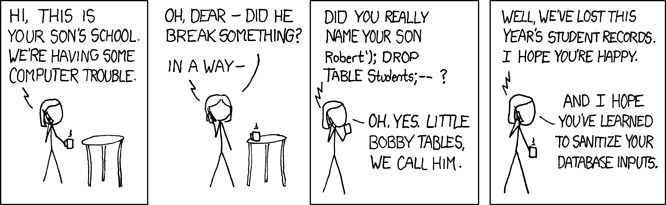
New breed of crackers..


SQL injection at its best. (From XKCD)

Sunday, September 23, 2007

Wrestling

Note :Do not try this at home without adult supervision

I have been using linux for the past 5 years and use it as my primary OS.. but once a while I have the "OOPS" moment. (No.. this does not mean that there is a problem with linux, just means that if it was any other OS I would have just done a boring clean install because there was nothing else I would be able to do).

I have got so used to larger disk space that when I installed Debian Etch on my "new" 900Mhz machine with 10 GB hard disk, I never put any forethought while partitioning the harddisk. I just went for the default 2G root partition and ~8 G /home partition. As expected, with my rampant abuse of the apt-get command, I pretty much filled the root partition. Now my 500G external disk was mounted on home folder and I did not need any space in there, so it made real sense to redistribute the space. Complication 1: The /root was on a primary hard disk partition and /home was an extended one so I could not use gparted and do any easy cut paste operation.

The right thing a sane person would have done was to cpio the whole disks, repartition and then cpio the stuff back and fix the tiny inconsistencies along the way..but no. I was crazed beyond imagination. I created two disk images with dd and tried to restore them after repartitioning. This wouldn't be a problem for the root partition as the size of the formatted drive was bigger than the disk image..not so with the /home partition. /home didn't have anything anyway, so I thought that even if the image got partially copied, I would be able to fix the number of blocks in the superblock. (Now you know the meaning of the phrase: Little knowledge is a dangerous thing). I had never used dd earlier and had no idea whether this would work.. but what the heck, its all about keeping the spirit of adventure alive.

So after copying the larger disk image onto the smaller /home partition. I ran mkefs2 -S to fix the superblocks and ran e2fsck -y to check the filesystem and fix the errors automatically. It cleaned out my /home directory.. by that I mean it deleted everything.(btw I also tried dls and foremost before performing the step.. these are industrial strength forensic tools.. courtesy of Debian repositories).

Finally I did a clean install but fell asleep half way while configuring it. After waking up I discovered that I had deleted the font files, X, gdm, and few other gnome packages while asleep. I couldn't figure out the packages I had deleted while asleep (may be I wanted to get rid of them at a sub-conscious level :) and no amount of apt-get seemed to startup gdm.. I gave up and did another clean install. Hopefully this should be the last install.. today. All the software mishaps predicted by Murphy's law have already happened.

This exercise made me realize how rusty my sysadmin skills have become since linux became all "user-friendly".. ah the good old rh6 days.

Saturday, August 18, 2007

Why do you need PGP?

Lets answer a more basic question first: Why do you need any security constructs like AntiVirus, firewall, IDS etc? Maybe because:

  • You have secret/vital information to protect.
  • The exploit/attack is so easy that any casual user can do it.. for fun.

On my laptop running Linux I don't have an antivirus, firewall or IDS.. I don't have any critical information on my laptop (the critical information is encrypted using my DNA sequence, scrambled using my iris pattern as seed, divided into blocks and stored on NSA servers :P), nor does it run continuously to give the attacker any time to conduct the attack... It's a different story altogether for workstations running 24x7. That said, why do I need PGP to encrypt/authenticate my mails then? It's not that I need to protect my mails from the public eye or even a passive listener.. come on, what can a person get by reading the emails I write to my friends and family!!.. The problem arises when he can write emails to my friends and family using my email ID.. and be undetected. The point of concern is how much easier it is to do so.. let me show you how:

PLEASE NOTE: Doing this is illegal in US and EU unless you own the email addresses you are using. Posing as a third party is considered Identity theft and is a criminal offense. I am using the email address that belongs to me and this demonstration is only for the educational purposes. I am not responsible for anything you might do with the information provided here.

  • Cover your tracks: What better way to do that than tor+privoxy!! Since I will be using telnet for this exploit, I need a way to torrify telnet. torrify command does that but I was too lazy to figure out the syntax. I grabbed tor_aliases to do that. Its a small script that you add to your .bashrc , which automatically torrifies various net tools like telnet, scp etc.(Thanks t3rmin4t0r for pointing it out to me on #linux-india).
  • Find the smtp server of the victim: I am going to send a mail to testingusage@gmail.com(again the ID belongs to me and I use it for testing purposes). Lets figure out which smtp server gmail uses..


  • sridhar@pico:~$ dig mx gmail.com
    ; <<>> DiG 9.3.4 <<>> mx gmail.com
    ;; global options: printcmd
    ;; Got answer:
    ;; ->>HEADER<<- opcode: QUERY, status: NOERROR, id: 8033
    ;; flags: qr rd ra; QUERY: 1, ANSWER: 5, AUTHORITY: 0, ADDITIONAL: 7

    ;; QUESTION SECTION:
    ;gmail.com. IN MX

    ;; ANSWER SECTION:
    gmail.com. 3534 IN MX 50 gsmtp183.google.com.
    gmail.com. 3534 IN MX 5 gmail-smtp-in.l.google.com.
    gmail.com. 3534 IN MX 10 alt1.gmail-smtp-in.l.google.com.
    gmail.com. 3534 IN MX 10 alt2.gmail-smtp-in.l.google.com.
    gmail.com. 3534 IN MX 50 gsmtp163.google.com.

    ;; ADDITIONAL SECTION:
    gmail-smtp-in.l.google.com. 214 IN A 209.85.199.114
    gmail-smtp-in.l.google.com. 214 IN A 209.85.199.27
    alt1.gmail-smtp-in.l.google.com. 237 IN A 64.233.167.114
    alt1.gmail-smtp-in.l.google.com. 237 IN A 64.233.167.27
    alt2.gmail-smtp-in.l.google.com. 285 IN A 66.249.91.27
    gsmtp163.google.com. 5883 IN A 64.233.163.27
    gsmtp183.google.com. 4017 IN A 64.233.183.27

    ;; Query time: 64 msec
    ;; SERVER: 192.168.1.1#53(192.168.1.1)
    ;; WHEN: Sun Jul 29 14:05:57 2007
    ;; MSG SIZE rcvd: 270


    MX points to the servers that receives email. The numbers 50,5,10,10,50 you see are preference numbers. Lower the number, the higher the preference.. for us it means that we have higher probability of a successful attack. which implies that we will be using gmail-smtp-in.l.google.com.

  • Speaking SMTP: The last step is to speak in SMTP to make the server to accept the mail. I am not going to teach you SMTP here. Check out RFC 821 for the details.
  • sridhar@pico:~/blog$ telnet gmail-smtp-in.l.google.com. 25
    Resolving gmail-smtp-in.l.google.com. through tor... 209.85.129.27
    Trying 209.85.129.27...
    Connected to 209.85.129.27.
    Escape character is '^]'.
    220 mx.google.com ESMTP o11si2850482fkf
    502 5.5.1 Unrecognized command o11si2850482fkf
    helo
    250 mx.google.com at your service
    mail from: <testingusage@gmail.com>
    250 2.1.0 OK
    rcpt to: <testingusage@gmail.com>
    250 2.1.5 OK
    data
    354 Go ahead
    From: Someone <someone@someone.com>
    Subject: Testing

    I see the light!!

    .
    250 2.0.0 OK 1187318464 o11si2850482fkf
    quit

Please do note that testingusage@gmail.com is my own ID, so no harm done. What have I just done? Sent an email to testingusage@gmail.com as someone@someone.com... I could have used any email address there and nothing will be traceable back to me. The following screenshot shows you the result:


As you can see that the message was marked as spam, that is because I did not create the mail properly and someone.com may be in its blacklist. It's fairly easy to fool those spam filters.

Infact the method just demonstrated is used alot by spammers.. just a bit more refined and automated. Nothing is stopping your mortal enemy from impersonating you and wreak a havoc in your life. Yes there are ways to detect a fake mail.. IP analysis, route it takes etc etc, but it all requires the receiver to be a paranoid geek. How many mails do you receive daily and how many times have you stopped to check the authenticity of the mail?

So what is the solution?.. PGP or it's free, open source implementation GPG(GNU Privacy Guard). There are millions of tutorials on the web so am not going to write another one here.

In a nutshell, it attaches a keyed hash to your mail. Since it uses DSA, only you posses the key to create the hash. All others users can only verify your hash using your public key (which has to be published on keyring servers e.g. http://pgp.mit.edu ). The email client takes care of the whole process so you don't have to do anything except the initial setup.

Is it fool proof? NO.. This will only stop casual attacks. The attacker may spoof your identity, create a public key with your credentials and ask the receiver to download his public key, so the receiver might consider your emails fake and the attacker's emails real, but of course this is not something your friend might do for fun.

Bottom line; if you are breaking up with someone on email, proposing someone or making a million dollar deal, use GPG to tell the receiver that it's really you :)
BTW my pgp key is this. That said I can always deny sending a mail which doesn't have my signature... which I might use to satisfy my evil ends ..Mwahahahaha.

PS: There are chances that the attack shown above might not work. This would happen if your IP is blacklisted.

Sunday, August 12, 2007

Software piracy.. we need to re-evaluate our definition.

Let me throw away my "Ms Universe" stance and admit that I am a hypocrite. I want to get stuff for free but I want others to pay for the things/softwares I create/produce. Apparently there are a lot of people who think like me, a lot of them do not produce/create anything.. they basically want stuffs for free.. which leads to piracy.

First of all, we need to assert the true meaning of the word Pirate; basically a thief/burglar working mostly off-shore. What do you need to do to be a pirate? umm... kill few people, take their belongings and perhaps wear an eye patch (Arrrrr..). Now how did the word piracy come to mean a guy sharing his music/software while still retaining the original copy of the music/software, I'll never know. The word coined by the likes of MPAA and RIAA (perhaps one of them but am not sure) totally defaces the normal norms required for the existence of a society.

By this time most of you anti-piracy advocates would be yelling : THERE SHOULD BE A REWARD FOR INNOVATION. Sure.. there should be one, but creating something does not justify being greedy. Apple developed iPOD in 6 months and as of April 2007 has sold 100 million copies.. isn't that a big enough reward. Harry Potter and the deathly hallows was the most preordered book in history and J.K.Rowling is a millionaire.. isn't that a big enough reward. Yes they are loosing couple of million dollars.. am sorry that they wont be able to buy the unicorn and a gold coated private jet.

Software Pirates are not kleptomaniacs who just download anything off the internet... just the stuff they dont want to pay for. E.g I will never download 300 or watch it on the television.. but I wont pay $10 to watch You, Me and Dupree in a theater. Being a movie junkie, I cant resist seeing the movie either.

Digital piracy is here to stay. Why? Because reverse engineering is always easier than engineering and the people who crack the DRMs and torrent the files are much more smarter than the people who put the DRM in the first place. Its a cold war thats going on between the sofware geeks and the stuffy corporate marketing managers on a turf where the geeks have spent their whole life... it's not too difficult to predict the outcome with most of the major players shunning DRM and MPAA/RIAA. Also the American law forbids the export/import of any strongly encrypted software (i.e. can't be cracked by NSA).. which means that the technology is always going to be crackable.

Lets do the math now.
US population: 301,139,947
Broadband Access: 40,876,000
Lets restrict our calculation to movies. Percentage of illegal movie downloads= 20%
Note that I am just considering broadband users so have accordingly bumped up the percentage by a conservative estimate of 2% (the source mentions 18% total).
=>Total number of Americans downloading movies= 8,175,200 (the real number is actually 25 million).
Number of cases filed= 87
Probability of getting caught = 87/8,175,200=.000001

Need I say more!!

Saturday, July 14, 2007

Vim-blogger and Markdown

This guy blogged about posting blogs from emacs, and for reason unknown to me it stirred my old itch to post blogs within the VI editor... with complete support for different teeny nifty features that I have built into my template over the years, without using html(that just breaks the thought process and I can never get it just right). I also needed the dynamic spell check support in firefox2 that I've gotten so used to.
A bit of googling revealed that there was already a vim-blogger plugin!! Some guy known as The Geek Wannabe already had everything in place. The only thing I had to do was follow the steps. The guy did it using GData API. Markdown was included in it, which mean that I can do all the occasional formatting like this code:

#include<iostream>
#include<string>
int main()
{
std::cout<<"Hello World\n";
}

without sweating about replacing the < like signs with & lt; or adding quoted text like this:

Yeehaw.. I am in quotes.

Adding spell check support was a simple matter of invoking :setlocal spell spelllang=en_us.
This post is written and posted completely within *vim*..so all the emac guys out there.. up yours :P. Geek Wannabe, you should run for President's position.


PS: Ah.. bit of rough around the edges indeed.. but all for vim-love.

Sunday, July 01, 2007

Whistling at your computer

Those of you following Slashdot would have noticed the IBM's article to provide commands to your computer by whistling at it. I decided to give it a shot on Ubuntu7.04. Follow these steps to get it working flawlessly on Ubuntu:
  • $sudo apt-get install libsndfile1 libsndfile1-dev libglut libglut-dev
  • Follow the instructions in the linked article and download the file cmdWhistle.pl
  • Replace the functions getEpochSeconds and getEpochMicroseconds in cmdWhistle.pl with this code:

    use Time::HiRes qw(gettimeofday); #Add at the beginning of the file

    sub getEpochMicroSeconds {
    my $seconds=0;
    my $microseconds=0;
    my $timeVal;
    ($seconds, $microseconds) = gettimeofday;
    $timeVal = $seconds.$microseconds;
    $timeVal = substr( $timeVal, 6);

    my $padLen = 10 - length($timeVal);
    $timeVal = $timeVal . "0" x $padLen;

    return($timeVal);
    }#getEpochMicroSeconds

    sub getEpochSeconds {
    my $seconds=0;
    my $microseconds=0;
    ($seconds, $microseconds) = gettimeofday;
    return $seconds
    }#getEpochSeconds

  • After this you can pretty much follow the same instructions that the article explains.
I tried running the few commands(did not try the windowing commands using xwit though) after which my mouth started to hurt and I could not whistle a consistent tune afterwards :( It's a good piece of software, and the sndpeek program that it uses is really awesome and feature rich but I think using whistle as an input is totally infeasible for me.
On the other hand, if you know how to play any kind of wind instrument(like flute, clarinet etc) you can easily write a superkewl password login utility that takes a particular tune as an input... sounds right out of a hollywood movie, doesn't it :)

Sunday, June 24, 2007

Apple: fishy fishy...

Earlier this month Apple released Safari for Windows. Why this sudden generosity from Apple? Why did Apple suddenly jump into the browser market.. I mean sure Apple had its browser on the market for a long time but it was more of a passive player. Even the most ardent apple fanboys used firefox on Macs. The great Stevo himself confessed that he used firefox, so why put all the time and effort porting the browser to a different platform??

At the WWDC Steve Jobs mentioned that they would like to have a sizable market share in the browser market. In fact he predicts that IE7 and Safari would be the only two browsers left in the market. Call me a conspiracy theorist.. but I think thats a load of crap. Knowing Mr Jobs, I don't think he had the browser market on his mind. If you have a Windows installation, give safari a shot and you'll know what am talking about.

Safari on Windows is definitely faster than Firefox and IE. I am a huge Firefox fan but the superkewl interface of Safari makes me wanna boot into Windows. Although the font rendering is not crisp, just the speed and Apple's zen like interface designing approach makes browsing a totally different experience. To top it all, apple went through all the trouble of retaining the tiny special effects like rollover in their browser. I have a big appetite for effects and beryl on Ubuntu takes care of that pretty well but you gotta give Apple the credit for putting those effects where its least intrusive and least expected.

90%(maybe more) of the Windows crowd do not have access to a Mac and have never heard of Linux. By providing a windows app, Apple is using Microsoft to advertise its technology. These simple effects are enough to blow the socks off any casual Windows user. Most computer users just want an eye candy pc for browsing or word processing... Apple computers do that and look good too. An app as simple as a browser showcases Apple's technology and their capability. Its a perfect setup to woo Windows users. In my opinion Apple's not eying the browser market.. but the OS market. The timing couldn't be better.. MS is trying to change its product line and challenge Google. We are witnessing a clash of titans, Google, MS and Apple. The evil geniuses of Bill Gates and Jobs, and the combined minds of thousands of geniuses employed by Google makes the outcome totally unpredictable.

I guess we can grab our bag of popcorns and watch the show.